Adventure of Cavin (Infinite Lives Mod — a journey home)
Fast Download : Download this app by PureMods App with faster speed.
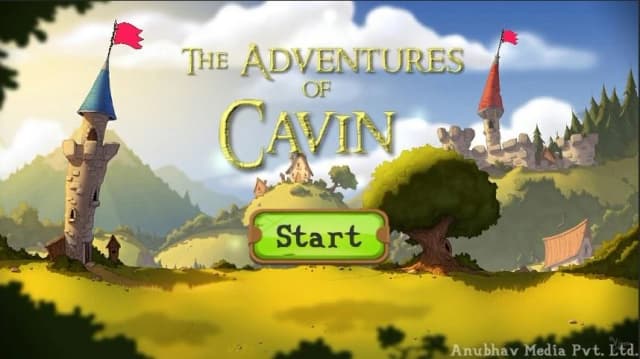



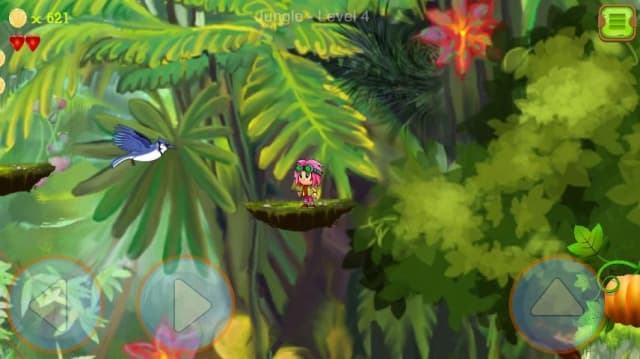
Adventure of Cavin Mod APK gives Cavin infinite lives as he battles creatures and navigates the dangerous route home. That extra breathing room can make tricky encounters less punishing while keeping the adventure’s story and challenges in focus. Guide Cavin through a dark forest, face spiders, birds, turtles, and other opponents, and rely on his dragon friend to cross long islands. The game pairs accessible controls with challenging levels, colorful scenes, and musical stages. This Android edition is suited to players who want to explore each stage without losing progress after every mistake. Read on for the mod’s confirmed benefit, practical gameplay guidance, and installation steps from PureMods.
Adventure of Cavin Mod APK Features
- Infinite lives: The confirmed mod benefit gives Cavin unlimited attempts during the journey. You can recover from mistakes and keep moving through encounters without the usual life limit.
- More room to learn: Repeated attempts make it easier to observe how obstacles and opponents affect your route. This can help you approach a difficult section with a clearer plan.
- Story-focused progress: With infinite lives, setbacks are less likely to interrupt your effort to help Cavin return home. The mod does not add confirmed coins, unlocked skins, or other bonus features.
This is a focused change rather than an all-features bundle. The listed advantage is infinite lives; the familiar adventure, enemies, and level challenges remain central to the experience.
What Makes This Mod Special
Adventure of Cavin Mod APK changes the pressure of failure without changing the game into a different genre. Infinite lives are useful when you are learning the timing around an enemy or working out how to pass an obstacle in the dark forest. Instead of treating one mistake as the end of a run, you can make another attempt and continue exploring.
That benefit suits a story-led adventure where progress means helping Cavin reach home. It also makes the APK a practical option for players who want to see more of the levels and scenes at their own pace. The modification described here is specific: it provides infinite lives. Features such as an unlimited money mod, ad removal, or all content unlocked are not confirmed, so they should not be expected.
About Adventure of Cavin
Adventure of Cavin is an adventure game about helping a boy named Cavin make his way safely home. The available information does not identify its developer or publisher. During the journey, Cavin faces creatures including spiders, birds, and turtles, as well as obstacles in a dark forest. His dragon friend helps him cross long islands. The game combines enemy encounters, tricky levels, story scenes, and musical stages. Its straightforward premise and accessible play make it easy to understand, while varied creatures and obstacles add challenges along the route.
How to Play Adventure of Cavin: Tips
Guide Cavin through each stage, watching for opponents and environmental hazards as you move toward home. The story identifies spiders, birds, and turtles among the creatures you may encounter, so pay attention to what appears ahead rather than rushing blindly. When the dragon helps Cavin cross long islands, treat that section as part of the route and follow the on-screen progression.
- Scan the path: Look ahead for creatures and obstacles, especially in the dark forest, before committing to a move.
- Use retries to learn: Infinite lives let you try a section again. Notice where a failed attempt happened, then adjust your timing or approach.
- Take tricky levels steadily: Move through unfamiliar sections with care instead of assuming every obstacle behaves alike.
- Keep the story in view: Each encounter is part of Cavin’s journey home, so focus on progressing through the stage rather than chasing unlisted rewards.
These tips apply to the core Adventure of Cavin gameplay, while the mod’s extra lives provide more opportunities to practice.
How to Download and Install Adventure of Cavin Mod APK
- Open the Adventure of Cavin Mod APK page on PureMods and review the available version information before downloading.
- Tap the download option on the page and wait for the APK file to finish downloading to your Android device.
- Before installation, open your device settings and allow installation from this source. Depending on your Android version, this permission may appear as “Unknown Sources” or as permission to install unknown apps for your browser or file manager.
- Open the downloaded APK file and follow the Android installer prompts to install the game.
- When installation finishes, launch Adventure of Cavin and confirm that the game opens as expected.
For the Adventure of Cavin Mod APK download, use the PureMods page and check that the version details match the file you selected. Download now from PureMods and follow the prompts shown on your device.
FAQs About Adventure of Cavin Mod APK
What does the infinite-lives feature change?
It removes the usual limit on Cavin’s lives, giving you more attempts during encounters and tricky sections.
Does the mod include unlimited coins or unlocked skins?
No such extras are confirmed in the available mod details. The stated modification is infinite lives.
Which enemies appear during Cavin’s journey?
The game description mentions spiders, birds, turtles, and other animal opponents, along with obstacles in a dark forest.
What does Cavin’s dragon friend do?
The dragon friend helps Cavin cross long islands as he continues the journey home.
Is Adventure of Cavin designed for Android?
The Mod APK is an Android package. Check the version information and installation prompts on your device before proceeding.
What should I check if the APK will not install?
Confirm that the download completed, review the Android permission for installing unknown apps, and check that the version file is the one you intended to install.