G-Stomper Producer APK (MOD: Pro)
Updated
2026-09-11
Version
5.9.4.7
System
Android
Category
Music & Audio
Price
Free
Download APK
Fast Download : Download this app by PureMods App with faster speed.
MOD: Pro
G-Stomper Producer: Professional DAW & Music Sequencer
G-Stomper Producer is a fast and flexible Music Sequencer and Digital Audio Workstation, engineered for both studio production and live performance. Unlike traditional pattern-based sequencers, it features a powerful engine with independent track timing, allowing you to play patterns of different lengths and quantizations simultaneously and in any combination.
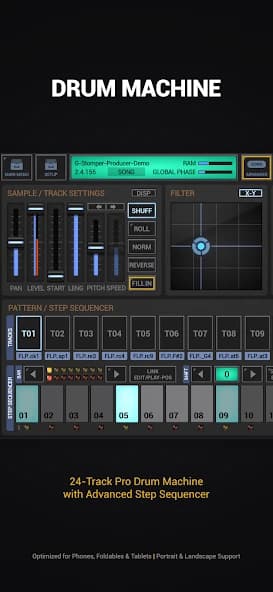
Design unique sounds with the integrated Virtual Analog and polyphonic Synthesizer (VA-Beast), or build hammering beats with the 24-Track Drum Machine/Sampler. Whether you are jamming live or arranging complex studio tracks, G-Stomper Producer provides the power of a modern DAW with the soul of a classic groovebox.
Pro-Grade Production Features:
• Advanced Sequencing: Pattern-based arrangement with independent track lengths and measures per track
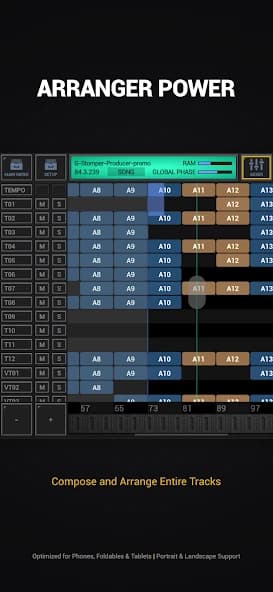
• Multi-Track Song Arranger: Graphical multi-track arranger with up to 39 tracks
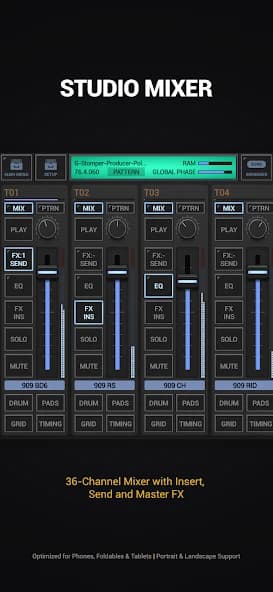
• Professional Mixer: 36-channel line mixer with 3-band parametric EQ and 2 insert effects per channel
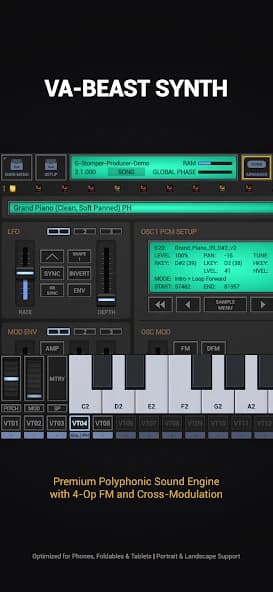
• VA-Beast Synth: Multi-timbral polyphonic virtual analog synth with FM and PCM engines
• Ableton Link: Play in sync with any Link-enabled app, Ableton Live, and Link-enabled hardware over WiFi
• Full MIDI Support: Round-trip MIDI (IN/OUT) via USB (host+peripheral) or Bluetooth LE (host/on Android 12+)
Instruments and Pattern Sequencer:
• Sampler/Drum Machine: Max 24 Tracks
• Sampler Note Grid: Monophonic Melodic Step Sequencer, max 24 Tracks
• Sampler Drum Pads: 24 Drum Pads for live playing
• VA-Beast Synthesizer: Polyphonic Virtual Analog Performance Synth
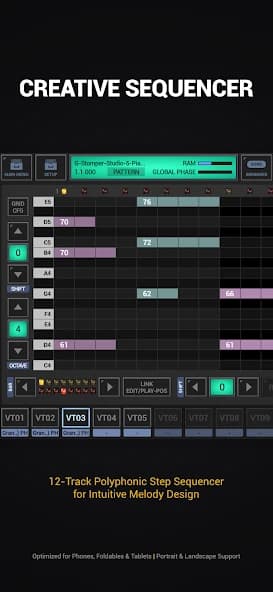
• VA-Beast Poly Grid: Polyphonic Step Sequencer, max 12 Tracks
• Piano Keyboard: 8 Octaves switchable
• Timing & Measure: Individual Swing Quantization, Time Signature, and Measure per Track
Mixer & Arranger:
• Line Mixer: Up to 36 Channels, Parametric 3-band EQ + 2 Insert Effect Units per Channel
• Effect Rack: 3 chainable Effect Units for group processing
• Master Section: Master Out, Parametric 3-band EQ, 2 Insert Effect Units
• Tempo Track: Dedicated Sequencer Track for Tempo Automation
• Track Pattern Set: Live Pattern Arranger with 64 concurrent Patterns per Track
• Scene Set: Up to 64 Scenes for creative Live Arrangements
• Song Arranger: Graphical Multi-Track Song Arranger with up to 39 Tracks
Feature Highlights:
• High Quality Audio Engine: 32bit float DSP algorithms
• Real-Time Audio Recording of your live sessions
• WAV Export: 8..32bit up to 96kHz, sum or track-by-track for use in any DAW
• MIDI Export: Export Scenes/Patterns as MIDI for use in your favorite desktop DAW
• 47 Effect Types: High-quality dynamic processors, resonant filters, distortions, delays, reverbs, vocoders, and more
• Effect Features: Side Chain Support, Tempo synced LFOs/delays, and Envelope Followers
• User Sample Support: WAV and AIFF up to 64bit, MP3, OGG, FLAC
• Support for additional Content-Packs
• Tablet optimized with Landscape and Portrait mode support
• Audio Editor: Graphical Sample Editor and Recorder
Support:
FAQ: https://www.planet-h.com/faq/
Forum: https://www.planet-h.com/gstomperbb/
Manual: https://www.planet-h.com/documentation/
Minimum device specs:
1.5 GHz Octa-core CPU, 1024 * 768 screen resolution
Recommended device specs:
2.4 GHz Octa-core or faster CPU, 1920 * 1080 or higher screen resolution
Check out the free demo before buying.
Permissions:
Bluetooth Connectivity: MIDI over BLE
Microphone Access: Audio Sample Recorder
Local Network Access: Ableton Link Synchronization
Foreground Service for Media Playback & Notification: Once activated by the user (via Stop-Lock), this is required to keep the audio engine running and playback active while the app is in the background or the screen is locked.
G-Stomper Producer is a fast and flexible Music Sequencer and Digital Audio Workstation, engineered for both studio production and live performance. Unlike traditional pattern-based sequencers, it features a powerful engine with independent track timing, allowing you to play patterns of different lengths and quantizations simultaneously and in any combination.
Design unique sounds with the integrated Virtual Analog and polyphonic Synthesizer (VA-Beast), or build hammering beats with the 24-Track Drum Machine/Sampler. Whether you are jamming live or arranging complex studio tracks, G-Stomper Producer provides the power of a modern DAW with the soul of a classic groovebox.
Pro-Grade Production Features:
• Advanced Sequencing: Pattern-based arrangement with independent track lengths and measures per track
• Multi-Track Song Arranger: Graphical multi-track arranger with up to 39 tracks
• Professional Mixer: 36-channel line mixer with 3-band parametric EQ and 2 insert effects per channel
• VA-Beast Synth: Multi-timbral polyphonic virtual analog synth with FM and PCM engines
• Ableton Link: Play in sync with any Link-enabled app, Ableton Live, and Link-enabled hardware over WiFi
• Full MIDI Support: Round-trip MIDI (IN/OUT) via USB (host+peripheral) or Bluetooth LE (host/on Android 12+)
Instruments and Pattern Sequencer:
• Sampler/Drum Machine: Max 24 Tracks
• Sampler Note Grid: Monophonic Melodic Step Sequencer, max 24 Tracks
• Sampler Drum Pads: 24 Drum Pads for live playing
• VA-Beast Synthesizer: Polyphonic Virtual Analog Performance Synth
• VA-Beast Poly Grid: Polyphonic Step Sequencer, max 12 Tracks
• Piano Keyboard: 8 Octaves switchable
• Timing & Measure: Individual Swing Quantization, Time Signature, and Measure per Track
Mixer & Arranger:
• Line Mixer: Up to 36 Channels, Parametric 3-band EQ + 2 Insert Effect Units per Channel
• Effect Rack: 3 chainable Effect Units for group processing
• Master Section: Master Out, Parametric 3-band EQ, 2 Insert Effect Units
• Tempo Track: Dedicated Sequencer Track for Tempo Automation
• Track Pattern Set: Live Pattern Arranger with 64 concurrent Patterns per Track
• Scene Set: Up to 64 Scenes for creative Live Arrangements
• Song Arranger: Graphical Multi-Track Song Arranger with up to 39 Tracks
Feature Highlights:
• High Quality Audio Engine: 32bit float DSP algorithms
• Real-Time Audio Recording of your live sessions
• WAV Export: 8..32bit up to 96kHz, sum or track-by-track for use in any DAW
• MIDI Export: Export Scenes/Patterns as MIDI for use in your favorite desktop DAW
• 47 Effect Types: High-quality dynamic processors, resonant filters, distortions, delays, reverbs, vocoders, and more
• Effect Features: Side Chain Support, Tempo synced LFOs/delays, and Envelope Followers
• User Sample Support: WAV and AIFF up to 64bit, MP3, OGG, FLAC
• Support for additional Content-Packs
• Tablet optimized with Landscape and Portrait mode support
• Audio Editor: Graphical Sample Editor and Recorder
Support:
FAQ: https://www.planet-h.com/faq/
Forum: https://www.planet-h.com/gstomperbb/
Manual: https://www.planet-h.com/documentation/
Minimum device specs:
1.5 GHz Octa-core CPU, 1024 * 768 screen resolution
Recommended device specs:
2.4 GHz Octa-core or faster CPU, 1920 * 1080 or higher screen resolution
Check out the free demo before buying.
Permissions:
Bluetooth Connectivity: MIDI over BLE
Microphone Access: Audio Sample Recorder
Local Network Access: Ableton Link Synchronization
Foreground Service for Media Playback & Notification: Once activated by the user (via Stop-Lock), this is required to keep the audio engine running and playback active while the app is in the background or the screen is locked.
How to Download and Install G-Stomper Producer: Music DAW MOD APK?
- Download the APK from the link on this page.
- Allow unknown apps when Android prompts you.
- Open the downloaded file and tap Install.
- Launch the app after installation.
What is G-Stomper Producer: Music DAW MOD APK?
It is a modified Android package of G-Stomper Producer: Music DAW with the MOD features described on this page.
How do I install G-Stomper Producer: Music DAW MOD APK?
Download and open the APK, then tap Install.
Is G-Stomper Producer: Music DAW MOD APK free?
Yes, it can be downloaded from this page without charge.