
Kung Fu Z (Money Mod — kung fu attacks against zombie hordes)
Fast Download : Download this app by PureMods App with faster speed.




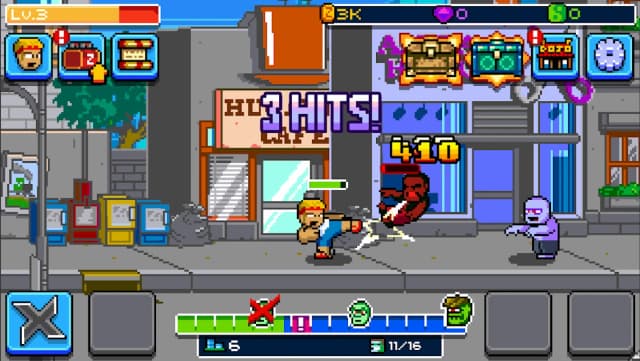
Kung Fu Z Mod APK adds unlimited money to a pixel arcade brawl against waves of zombies. Help Zak punch, kick, and headbutt through a pixel city overwhelmed by the walking dead. This modified Android edition supplies unlimited money, easing the game's money-based progression between fights and upgrades. That boost lets you focus more on combat choices than saving currency between encounters and upgrades. The original arcade loop still centers on attacks, training, gear, allies, and boss battles against zombies. Use punches, hurricane kicks, and headbutts while building toward stronger martial-arts progress through each stage. Read the feature notes and installation steps here before choosing the PureMods download for your device.
Kung Fu Z Mod APK Features
- Unlimited money: The confirmed modification provides unlimited money, so currency is less of a constraint as you engage with the game's progression and available purchases.
- More room to explore upgrades: With money available, you can spend less time holding back currency and more time exploring the equipment and progression choices the game presents.
- Keep the arcade action moving: The money benefit supports a brisker route through combat and training without claiming changes to the core fighting mechanics.
- Mod-focused Android package: Kung Fu Z Mod APK is the modified edition described here. The supported mod feature is money; claims such as unlocked skins, god mode, or an ad-free experience are not confirmed.
What Makes This Kung Fu Z Mod APK Special
The appeal is straightforward: the listed modification targets money, a resource that can otherwise compete with the action for your attention. Unlimited money can make it easier to consider available purchases and progression options as they appear, rather than treating every spend as a major trade-off. That is useful in a game built around repeated arcade combat, training, and collecting gear. It does not mean every item, skill, or costume is automatically unlocked, and it does not promise invulnerability or altered enemy behavior. The combat remains centered on Zak's martial-arts attacks and zombie encounters. Players looking specifically for an unlimited money mod should find this distinction helpful when deciding whether this edition matches their expectations.
About Kung Fu Z
Kung Fu Z is a pixel-art arcade game about martial artist Zak, also called Zack in the supplied description, fighting a zombie outbreak in his city. Players help him take on the undead with punches, hurricane kicks, and headbutts, then advance through training and confront the threat led by Dr. Z. The game also features special abilities, attack combos, mythical Snake, Tiger, and Dragon powers, sidekicks, scrolls, weapons, combat gear, costumes, and boss battles. Its genre is arcade action. A developer or publisher name is not confirmed in the supplied game information, so this article does not assign one.
How to Play Kung Fu Z: Practical Tips
Zak's main job is to push through zombie groups using direct martial-arts attacks. Punches, kicks, and headbutts give the arcade combat its rhythm, while abilities and combos add variety as your training advances. Treat each encounter as a chance to learn the timing and reach of your attacks: avoid rushing into a crowd without a plan, and use your available moves deliberately. As you progress, pay attention to training, gear, weapons, and sidekick options. These systems give you different ways to prepare for tougher fights and boss battles.
For a beginner-friendly approach, focus first on understanding how Zak's attacks connect with nearby enemies. Try different attack combinations instead of relying on a single move, and notice which situations make a special ability useful. Check available equipment and training choices when the game offers them; unlimited money reduces the resource pressure in this Mod APK, but it does not replace learning combat. The game's version listed in the source is 1.9.26. Compare the version shown on the PureMods page with your installed copy when checking for the latest Kung Fu Z update.
How to Download and Install Kung Fu Z Mod APK
- Open the PureMods page: Locate the Kung Fu Z Mod APK download and review the listed version and mod details before downloading.
- Download the file: Tap the download option on PureMods and wait for the APK file to finish downloading to your Android device.
- Allow installation from this source: If Android blocks the installer, open the relevant device settings and enable permission for the browser or file manager under “Unknown Sources” or the equivalent install-unknown-apps setting. The wording and location can vary by Android version.
- Install the APK: Open the downloaded file, review the installation prompt, and choose Install. Wait for Android to complete the process.
- Launch and check the game: Open Kung Fu Z, confirm it starts correctly, and check the in-game money feature. Download now from PureMods.
Only enable the installation permission for the app handling the APK, and turn it off again afterward if you no longer need it. If installation fails, check that the file finished downloading and that Android has permission to install apps from that source. Do not assume an update is available unless the PureMods listing shows a newer version than the one you have installed.
FAQs About Kung Fu Z Mod APK
What does the money modification change?
The listed modification provides unlimited money. The source information does not confirm other changes to gameplay, characters, ads, or unlocks.
Does unlimited money automatically unlock every costume or ability?
No such automatic unlock is confirmed. The original game includes gear, costumes, abilities, and training progression, but the documented mod feature is money only.
Which Android version does this APK support?
The supplied details do not specify Android version requirements or device compatibility. Check the PureMods listing and your device's installation prompt before proceeding.
What game version is listed?
The source lists version 1.9.26. Check the current PureMods page for the version offered there, since listings may change.
Why does Android ask for Unknown Sources permission?
Android may require permission to install an APK obtained through a browser or file manager. Enable it for the app you are using when prompted, then manage the permission in device settings.
What should I do if installation does not start?
Confirm the download completed, open the APK from your device's downloads, and check that the relevant app has permission to install unknown apps. If the prompt reports a compatibility issue, consult the PureMods listing for its available version details.