
Sushi Roll 3D - Cooking ASMR Game (Free Shopping Mod: sushi, rolls and noodles for restaurant guests)
Fast Download : Download this app by PureMods App with faster speed.
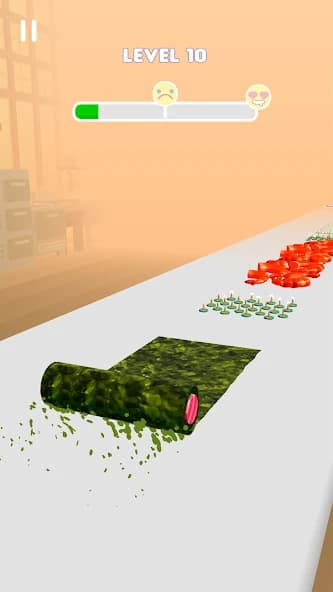

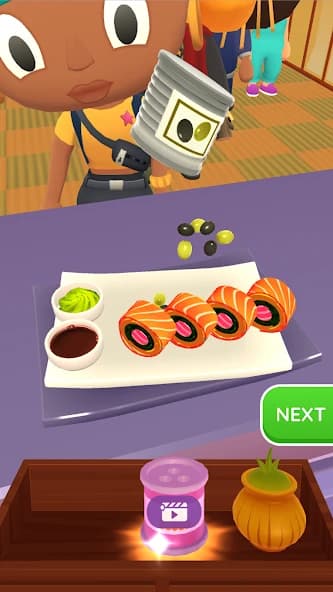


Sushi Roll 3D - Cooking ASMR Game Mod APK brings free shopping to your virtual Japanese restaurant. Every order becomes a chance to slice cleaner, roll smarter, and keep hungry customers coming back. Behind the soothing sounds, you still need good ingredients, careful preparation, and dishes worth generous tips. The listed modification focuses on free purchases, giving the shop a different role in your progression. That makes this version appealing when you enjoy restaurant improvements alongside satisfying little kitchen challenges. You can prepare sushi, handle fish, portion noodles, and discover more cooking actions as levels advance. This PureMods guide explains the confirmed benefit, practical cooking strategies, and installation steps before you start.
About Sushi Roll 3D: Your Restaurant, Your Cutting Board
Sushi Roll 3D - Cooking ASMR Game is a cooking arcade simulator with restaurant management elements, published by SayGames. You serve customers in a Japanese restaurant through short preparation challenges: rolling sushi, scaling and slicing fish, grating cheese, making rice, and weighing noodles into takeaway boxes. Dish quality and preparation speed influence customer reactions and tips. Progress opens more ingredients, actions, tools, and customization options, while restaurant improvements increase revenue per minute. Its colorful presentation, ASMR sounds, and optional vibration give the kitchen a relaxed atmosphere. The supplied reference identifies the modded version as 1.6.6.
Sushi Roll 3D Gameplay Guide and Pro Tips
Start by checking the customer's order, then follow the preparation task shown on screen. Sushi Roll 3D gameplay moves between different kitchen activities, so avoid treating every challenge like another rolling level. Fish preparation, cheese grating, and noodle weighing each ask you to pay attention to a different part of the dish.
- Collect ingredients with purpose. During sushi preparation, choose the right ingredients and avoid obstacles. Too much seaweed with too little fish can disappoint guests, while thumbtacks and moldy cheese are obvious ingredients to steer clear of.
- Build accuracy before speed. Customers appreciate food prepared quickly, but rushing into the wrong ingredients hurts dish quality. Learn the task first, then aim for a smoother sequence of actions.
- Read customer reactions. Likes and generous tips indicate a successful serving. An angry response is a useful prompt to reconsider your ingredient choices and preparation on the next order.
- Keep clearing levels. Progress introduces more fillings, toppings, and cooking actions. Surprise Box rewards can include ingredients, cutting tools, actions, and skins, giving you reasons to improve beyond the shop.
For a practical strategy, focus on balancing fish, rice, and seaweed before experimenting with unusual toppings. When a noodle task appears, shift your attention to portion weight. That change in focus matters more than repeating the rhythm of your previous sushi order.
Sushi Roll 3D - Cooking ASMR Game Mod APK Features
Free shopping is the confirmed modification. The supplied listing describes it as both free purchase and free shopping. The advantages below explain that single modification rather than suggesting several unrelated cheats.
- Free shop purchases. The mod changes the purchasing experience for eligible items in the in-game store. This gives you more flexibility to explore available purchases without the usual spending barrier.
- More room to try available upgrades. Where an upgrade is covered by free shopping, you can explore its role in your restaurant without first saving the normal purchase amount. Check the available shop options as you progress.
- Easier experimentation with shop bonuses. The original game includes purchasable special bonuses and upgrades. Free shopping makes eligible choices easier to try while you decide what suits your kitchen routine.
The source does not specify every affected item. It also does not confirm unlimited currency, automatic access to every skin, or advertising removal. Treat free shopping as the documented benefit, with its exact coverage determined by the available build and shop.
Why Free Shopping Fits This Cooking Experience
The appeal comes from connecting your cooking sessions with restaurant development. In the original game, earnings help you expand and improve the establishment. Furniture, dishware, decorations, and accessories provide another progression layer alongside preparing meals. Free shopping can reduce the saving required for eligible purchases, leaving more attention for the next order and the look of your restaurant.
There is still a reason to sharpen your kitchen skills. New actions and rewards are tied to progression, and the listed modification does not establish that these requirements disappear. A satisfying approach is to explore the shop when options become available, then return to improving your ingredient selection and serving quality.
The game's playful side also grows beyond traditional sushi. Bonus levels feature VIP guests and unusual objects such as gold, gadgets, and honeycomb. Those are original gameplay elements; the mod's specific contribution remains free shopping.
Download and Install Sushi Roll 3D - Cooking ASMR Game Mod APK
Ready to step behind the counter? Download now from PureMods, checking the displayed version and mod details before starting your Mod APK download. The supplied reference lists version 1.6.6; compare that information with the current page when looking for the latest Sushi Roll 3D update.
- Review the download details. Open the game's PureMods page and confirm that the listed modification is free shopping. Read any build-specific installation notes.
- Download the APK. Use the download control on PureMods and wait until the Sushi Roll 3D APK file finishes downloading.
- Allow installation when prompted. Enable Unknown Sources, or the equivalent permission to install unknown apps for the browser or file manager opening the package. Android wording varies by device.
- Install the package. Open the downloaded file, tap Install, and wait for Android to finish. If installation fails, check the message before making changes to an existing installation.
- Launch and check the shop. Open Sushi Roll 3D for Android, follow the introductory prompts, and inspect available store purchases. You can disable the installation permission afterward.
FAQs for Your Next Kitchen Session
Does free shopping mean the money balance becomes unlimited?
No unlimited balance is confirmed. The listing describes free shopping, which concerns purchases; it does not establish an unlimited money mod.
Will every ingredient and cooking action be available immediately?
That is not confirmed. The original game introduces ingredients and actions through progression, and the mod listing does not say those requirements are removed.
Which restaurant improvements should I look at first?
Check available furniture, dishware, decorations, and accessories. The original description connects restaurant upgrades with increased revenue per minute, but does not rank individual purchases.
Why do customers dislike a completed sushi roll?
Completing the task alone does not guarantee a good dish. Check ingredient balance, avoid contaminated items and obstacles, and aim for quality preparation without unnecessary delays.
Does version 1.6.6 represent the newest available release?
It is the version in the supplied reference. Check the current PureMods listing for available update details rather than assuming that reference establishes the newest release.
What should I check if Android refuses to install the APK?
Confirm the download completed and installation permission is enabled for the app opening it. Read Android's error message and the page's installation notes; preserve existing progress before removing any installed version.